Showing posts with label photography. Show all posts

22 May 2005

Review: Nikon D70 Firmware Upgrade 2

> more articles on digicams

Hot on the heels of Nikon’s launch of the new D70S and D50 comes a firmware upgrade to the D70 which promises to raise the D70 to ‘S’ specification. The only features you’ll then be missing from the newer D70S are the slightly larger 2” LCD screen, and the ability to use a manual cable release. Huge kudos to Nikon for demonstrating such commitment to their user base.
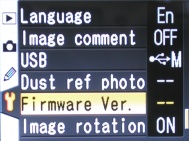
D70 updated menuI upgraded my trustee D70 a few days ago. The process is simple enough. You just download the zip file from Nikon, format your CF card, copy file A over, insert the CF card in the cameras and navigate through the camera’s menus until you find the Firmware version option. When you select upgrade the camera thinks for a couple of minutes and it’s done. Same process for file B and you have a D70S (almost).

[Incidentally, I suggest downloading from the US site here (Windows) or here (Mac). The equivalent UK and Australian sites require form filling, registration and serial numbers. That’s just a pain.]

But what does it to do for you? Well the immediately obvious thing is the revised menus (as shown). They were pretty intuitive in the first place, but now they look great too. Gone is the boring old blue, to be replaced by a new grey feel with yellow highlights a little more 3-D effect if I’m not mistaken. There’s no doubt it looks a little more modern and is also easier to read, especially in bright light. It’s a minor improvement, but a hit with me.

Nikon claim that performance of the 5-area AF system has been improved in Dynamic area and Closest subject modes. That’s got to be a good thing, because closest subject mode has frustrated me no end, sometimes seeming completely random in its choice of subject. I have abandoned it in favour of Single area mode some time ago. Now I have my AE-L button set to lock exposure only and my camera always set to single area AF, so that a half-pressed shutter button locks focus. The only time I might step away from that is when snapping a rapidly moving object in which case Dynamic area comes to the fore. And my initial (very subjective) tests suggest that the focusing is now better in both these modes. A little faster and a little more accurate in its selection of focus area, but I’ll still be sticking to my existing setup 98% of the time.

Nikon have also upgraded the PictBridge functionality, allowing page-size settings to be applied from the camera. Well, whoop-di-do. I’ve already stated what I think of PictBridge, and won’t be changing my mind there in a hurry!

Also upgraded is the display of remaining exposures in NEF (aka RAW) mode which always was a little screwy and pessimistic. Better that than optimistic, but closer to correct is probably the best alternative, and I’d say it is much more accurate now, although I seldom use RAW mode myself.

The penultimate change is that the default setting for the camera clock has been changed from 2004.01.01 to 2005.01.01 and you can no longer set the clock back to a date before 2004.12.31. Yup, it’s true. My world is changed forever :-)

Lastly, Nikon claim that a bug has been fixed which “sometimes caused communication between the camera and computer to be unexpectedly terminated when using Nikon Capture Camera Control”. I’ll have to take their word for that, as I have never tried Camera Control. Has anyone else experienced this problem?

So all in all, there’s nothing earth-shattering in this upgrade (which suggests the same of the D70S, although I have yet to try one) but enough to make it worth the effort of doing. It will make your already great camera just that bit nicer to use and probably improve the second-hand resale value. The most significant thing about it is is probably the message it sends, that Nikon cares, and that can't be a bad thing.

> more articles on digicams
Go to eebahgum!

21 May 2005

You need an optical viewfinder

> more articles on digicams

There’s a growing trend for digicam manufacturers to fit out their trendy consumer models with increasingly large screens at the expense of an optical viewfinder. Sony, Pentax, Canon and Nikon, companies who would know better, have all jumped on the bandwagon. What in heaven’s name are they thinking?

The optical viewfinder is one of the few indispensable features of a digital camera, as necessary for the basic point and shoot photographer as for anyone else. And here are some reasons why:
  • LCD screens, although constantly improving, are still very hard to read in bright light. Even if you like using them to frame photos you will still sometimes need to use an optical viewfinder.
  • LCD screens tend to flatten out depth of field, so even large ones are sometimes not entirely indicative of the picture you’re about to take.
  • LCDs, particularly large ones, churn through battery power if you always have them on. Turning off the LCD and using an optical viewfinder is a great way to get a few more crucial pictures out of your ailing battery.
  • Holding the camera up against your head is a great way of reducing camera shake, and far more stable than holding it out in front of you, especially with today’s very small cameras.
  • And for some people the most important reason of all is that you simply can’t look like a real photographer holding up a camera at arms length in front of tour face and squinting at an LCD. No-one in this pose looks cool or radiates a sense of extreme photographic expertise.

    > more articles on digicams
    Go to eebahgum!

26 April 2005

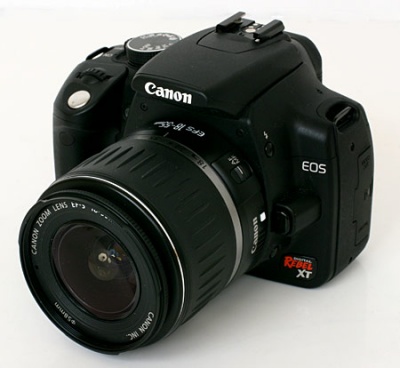
Review: Canon 350D (Rebel XT)

> more articles on digicams

Canon 350D Rebel XT

When the Canon EOS 300D (or Digital Rebel in the US) came on the market in late 2003 it revolutionised the camera market. It was the first decent DSLR that was (just) affordable enough for real people; a highly capable camera that didn’t require you to mortgage your house and your family. The 300D has gone on to become one of the biggest selling cameras of all time, and rightly so. It’s a good camera that takes very good pictures.

But a year and a half is a long time in the digicam world. A raft of more advanced competitors has come on the market and the 300D has started to look a little long in the shutter. And let’s face it, it was no up-market technological marvel in the first place. It suffered from a crippled feature set and plasticky build and oozed ‘cost-cutting’ rather than ‘premium quality’.

There can be do doubt that the new 350D (Digital Rebel XT) is an advance on the 300D in many ways. It boasts an excellent 8 megapixel sensor with Canon’s newer DIGIC II brain; it no longer suffers from deliberately crippled functions, and it’s smaller, lighter and much more responsive. Better quality, more features, reduced form factor, same price-point. A winning formula, surely?

Maybe, but I’ve spent a little time with the 350D, and frankly, I can’t help feeling that Canon have really missed an opportunity here. In many areas, the 350 still trails, or at least fails to better, the Nikon D70, its main competitor:
  • It has a small viewfinder, much like the D70. It’s not unusable, but it’s not exciting either.
  • It has a smaller CCD, despite the added resolution. That means a 1.6 multiplier on lend focal length. Good news if you are a telephoto photographer, but not for the average shooter looking for wide angle pics.
  • It has poorer battery life.
  • It has a smaller frame buffer.
  • Menu visibility is poorer and less intuitive.
  • It still has that annoying backplate control LCD. It’s undoubtedly less practical than a top-plate display and much more prone to scratches.
  • The standard zoom lens is really soft and more than negates any possible image quality improvement from the increase to 8 megapixels. It's not a subtle thing which would be obvious only to an expert—this lens is just downright poor.
  • It still feels cheap and plasticky. If this was my prime criticism of the 300D, the 350D is not much different. And however much Canon resellers try to push that as a feature, this is a camera which simply does not exude the near-professional image that the D70 manages to. The Nikon looks at the very least like a professional camera’s sibling. On several occasions it has helped me take photographs in situations where only credentialed journalists would ordinarily be allowed. The 350D improves on the 300D in this regard, but in the ‘prosumer’ world, it’s still less ‘pro’ than ‘sumer’.
All these weaknesses, as I see them, are almost certainly deliberate placement decisions by Canon so as not to dent the market for the EOS 20D. But up against offerings from Pentax, and Nikon, the 350D seems rather a disappointment, from a manufacturer whose offerings I generally have very high regard for. Of course, many people will buy it solely on the basis of the higher pixel count. But the bottom line is, in order to take advantage of that, you’ll have to upgrade from the standard kit lens, which will make the package relatively poor value, and knocking on the door of the far more desirable 20D.

If you are in the market for a DSLR and small size is a particular criterion, then the Pentax *ist DS is still my first recommendation. But the new Nikon D50, due to hit shops any moment now, appears to be simply a smaller D70 with almost all the features. If that’s the case, Nikon deserve to have a winner in this market segment.

> more articles on digicamsGo to eebahgum!

24 April 2005

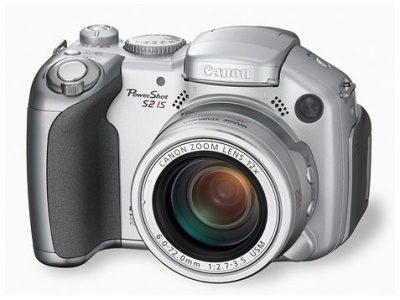
New Canon S2 IS—one of the world’s most desirable compact digicams?

> more articles on digicams

Canon_S2 IS

It may only have had a 3 megapixel sensor, but the venerable Canon S1 IS was close to compact digital camera perfection. The compact 10x optical zoom was coupled with a vibration reduction system which really worked (see my previous review, Shock results with long zoom digicams), a functional, albeit small, swivelling LCD screen, excellent movie mode, good handgrip, and let’s face it, very cool styling.

The only problem was that 3 megapixels seemed like a fairly low spec for the price. But megapixels can be deceptive, and my experience was that the S1 IS took very fine pictures, better than many 4 and 5 megapixel cameras.

It has seemed a long time coming, but a replacement camera was inevitable, and now the new S2 IS is here. It’s now a 5 megapixel style machine, with an improved 12x optical zoom, larger 1.8” LCD, 2.4 fps shooting speed and added focus assist lamp. It still has an excellent movie mode, the LCD still swivels, and the camera still has Canon’s excellent Image Stabilisation system. Regular readers will know that I consider Canon’s system better than Minolta and Panasonic’s offerings. Canon have simply been doing image stabilisation for longer, through their excellent video cameras, and have become pretty good at it.

The only area in which the S2 IS is not improved over its predecessor is in size and weight. Unusually in this world of increasing miniaturisation, the S2 is a little bigger and heavier than the old S1. At 113 x 78 x 75 mm and 405g it’s no back pocket special. It’s about the same size as Minolta’s Z5, and rather smaller than the Panasonic FZ20, its main competitors. And there’s another competitor in the wings, Sony’s new DSC-H1. The Sony has an impressive 2.5” screen (although it doesn’t swivel), but is heavier than Canon and Minolta.

I have to admit, the long zoom, anti-shake digicam market segment my favourite, and it’s certainly hotting up. But I have a feeling this new Canon will be the front-runner.Go to eebahgum!


> more articles on digicams

9 April 2005

Nikon D70 real-life review

> more articles on digicams
> related review: Nikon D70 Firmware upgrade 2.0


In 4 months my Nikon D70 has boiled in the 100 degree heat of Adelaide, sweated in the Singapore humidity, frozen on the ski slopes of Poland, been rained on in Berlin and snowed on in Disneyland Paris. On the way it has taken about 8,000 photos. Plenty of ammunition for a review. Of course, there are already many on the web that go into such extreme detail that I would add nothing. They are all based on the premise that minute differences in image quality are really critical and worth discussing for 20 pages. And I have read them all voraciously. This premise is, of course, largely nonsense. For example, I can't believe how many reviews have criticised the D70 for problems with moiré. In taking thousand of shots of every conceivable type, I have not seen moiré problems once, but I had been whipped into a frenzy of worry about it because of all the reviews.

The sad truth is that camera reviews, typically so influential on our purchasing decisions are seldom based around the question which is ultimately most important—what is the camera like to live with and use day-to-day?

To cut a long story short, the D70 is generally great, but still has several minor annoyances and a few major ones. I'll summarise the good, bad and ugly in this post. In the next few days I'll also post on how the D70 compares with the new Canon EOS 350D (or Rebel XT as they call it in the US) and the DSLR v top end compact digicam dilemma (which isn't really a dilemma at all).

The good
  • The D70 feels great in the hand. Sure it's big, but feels substantial, solid and secure. That’s a real benefit with a long lens.
  • It is responsive and fast. Power on to first shot is virtually instant. It has a large frame buffer, decent shooting speed in continuous mode (expect as noted below) and is always ready to shoot.
  • Image quality is generally superb.
  • Controls are generally well-placed and intuitive, except as noted below.
  • Top plate displays are nice.
  • The 18–70 lens is excellent.
  • The 70–300 costs next to nothing and feels light and plasticky (because it is) but actually pulls in some superb photos. It's a little soft, but for the money it's incredible value.
  • The built-in flash is pretty reasonable. This is something I have generally disliked about previous Nikon digicams I have used.
  • The little protective cover for the back panel LCD is great. It gets very hacked up and needs to be replaced regularly, but imagine your LCD taking that beating. The cover does tend to flip off a little easily though.
  • Battery life is fantastic. An amateur with pretensions like me will never run out of juice if even vaguely organised. In 4 months of heavy shooting I have only had to dig out my backup battery twice. On occasions I have shot 500 pictures or more over 3 or 4 days without a battery change, even though I have been using the flash occasionally and the LCD screen all the time.
The average
  • The viewfinder is too small.
  • I seldom use the depth of field preview any more because the button is just too far away from my pinky to be comfortable and maintain a firm grip on the body.
  • There's a tendency to underexpose from time to time. My pictures have got better; —it just seems to take a while to get used to how the exposure system thinks.
  • I find the image selection/viewing system a little unintuitive. In thumbnail mode using the left/right arrow keys navigates through images, but in full screen mode that toggles other functions and you need to scroll up and down. I'd also like to be able to magnify more so that I can actually see sharpness and noise.
  • The menu system could be simpler. You get used to it, but I think new users will find the little Pentax DS superior in this regard.
  • As I have experienced in the past, Nikon's battery status indicators leave a lot to be desired. They show full for ages, but when they show only slightly less than full you are going to be in trouble very soon. The same has been true of my Nikon 35 mm SLRs and all the Nikon digicams I have used.
  • The remote receiver on the camera body is quite directional. If you are standing on the wrong side of the lens it's often hard to get the shutter to fire.

The downright bad
  • There's no obvious way of seeing what ISO setting you're on without actually checking. Many a good photo has been rendered average because the previous night I had been shooting in low light and had cranked the 'film speed' up to 800 or 1600 ISO and forgotten to return it to 200. Next morning's beautiful shots turn out too noisy and have to be tweaked in a noise reduction package such as Neat Image or Noise Ninja. I'd like to see the ISO setting in the viewfinder and LCD panel all the time.
  • If you want Nikon's software with noise reduction capability (Nikon Capture) you have to fork out extra. That's a rip-off and an argument in favour of P2P file sharing if ever there were one.
  • You have to pay extra for the remote. It's quite cheap, but apparently hard to get in some markets. It should be in the box to start with.
  • Nikon's Picture Perfect software looks good, but in use it sucks. The older Nikon View was much more competent and I believe it can still be downloaded from Nikon websites.
  • My D70 does not shoot at 3 fps. And neither did my previous one. Out of the box it was fine, and then in a week or two seemed to have forgotten how to shoot fast. The camera store and Nikon could shed no light on the problem so they simply replaced my camera body. And now this one has the same problem. Is it something I have set? Probably, but no-one seems to know what.
Summary

For the money the D70 is a superb piece of kit. If you are looking at a camera in this price range, then buy one unless you absolutely must have something smaller, in which case the Pentax *ist DS, unpronounceable name aside, is excellent, as is the new Canon 350D (Rebel XT).

> more articles on digicams
Go to eebahgum!

5 April 2005


Clive and Jonathan on Brighton pier

Dusk at the seaside resort of Brighton in Sussex, unretouched

22 March 2005

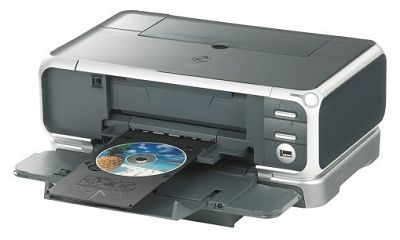
Canon Pixma IP4000 review: Look at the pix from my Pixma, ma!

Being in the UK for a few months having planned to only be here a few weeks, I find myself without many of the basic necessities—spa bath, home gym, radio control racing car, A3+ colour printer and so on. The last of those needs was pretty critical, so I set about finding myself a new printer. It was the usual brief—a printer which could do everything perfectly but cost next to nothing to buy or run.

Canon IP4000 CD

And there lies the rub with inkjet printers. The buy costs usually look cheap, but running costs are deceptively high, especially if you do any quality colour work such as photographs. So I looked at every printer on the UK market around the £130 pound mark, read every review, and bought the Canon IP4000 for less than £90 over the web from Pixmania in France. All the reviews said it was great at everything, but were they right?

Largely, yes. This printer is elegant, well-built, very fast (A4 page of text in 8 seconds; 6”x4” photo in less than 60 seconds), and full-featured. It duplexes, has a paper feeder and a built-in cassette, prints directly on to CDs and is absurdly quiet.

And the print quality is almost exceptional. With black text on plain paper, it is the fastest and best quality inkjet I have ever seen. With full colour photos it creates rich, saturated pictures with near photolab quality and only the merest hint of pixelation in areas of continuous colour to betray its humble pricetag. Honestly, most people will think they’re from the lab. The secret is in the 5 colour system Canon uses where there’s one black for text, and a second, richer, dye-based black to enhance dynamic range in colour prints. Compared to Epson 6-colour machines I’ve seen, it’s very nearly as good, but much cheaper and faster.

On the only printable CDs I’ve tried so far, Verbatim's fast dry disks, the images are as detailed as low-quality coated inkjet paper, and have a very slightly yellowish tinge, but the effect is fantastic. I’m now on the quest for some glossy disks to see how they look.

And according to some magazine reviews these near lab-quality prints will cost you around 29p for a 6” x 4”. That’s about 72c Australian or 50c US. Your photolab will do them for half the price and get marginally better quality, but for a convenient desktop solution for short runs, you can’t beat the IP4000. If you were to spend more money on a better inkjet, you may well end up with larger running costs as well as greater capital outlay.

Overall, for quality, value and flexibility, this little Canon is unbeatable. If you are in the market for a printer, buy one. Spending less would be a false economy as the higher running costs would take their toll fast enough. Spending more would simply be pointless if you have a photolab within a reasonable distance.
Go to eebahgum!

17 December 2004

Review: SanDisk Extreme Compact Flash cards

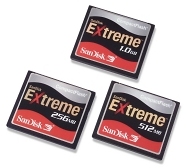
Sandisk Extreme CF cardsIt's pushing 100°F in the Adelaide shade today. In nine days I'll be on a plane heading for Poland and I'm likely to see sub-zero temperatures. Those sort of temperature extremes take a toll on digital devices, and memory cards can be particularly vulnerable.

SanDisk have responded to this challenge with their 'Extreme' range of memory cards. Not only are they tested in temperatures ranging from -13 to +185°F, they are all shock and vibration resistant. This is achieved by coating all the innards with a layer of silicone which SanDisk call 'industrial strength RTV'. That stands for Room Temperature Vulcanised, by the way, and is the only significant difference between the Extreme Cards and the slightly less pricey SanDisk Ultra II range.

So are they any good? Based on the evidence of my 512 Mb Compact Flash (CF) card, the answer is a resounding 'yes'. This is the fastest CF card I have used and has performed without a hiccup so far. The silicone coating and temperature rating certainly give me a nice warm feeling, although I have to admit I've never seen a CF card fail except by rank carelessness during insertion (not by me, I hasten to add).

Cards in the Extreme range will set you back about twice the price of equivalent 'ordinary' cards and are available in sizes up to 4 Gig. If you work in strange environments or are simply concerned about having the most reliable cards available, then they're a no-brainer. I'd still recommend buying two cards half the size you need rather than one huge one. That way you can keep shooting if one fails or disappears. And although these cards are fast, SanDisk have just released the Extreme III range which are faster still for only a few more dollars.

QUALITY: 5 blackpuddings VALUE: 3 blackpuddings
VERDICT: Pricey, but fast, and the only choice if data integrity is important to you or you work in extreme conditions. Get an Extreme III if you really need speed.Go to eebahgum!

12 December 2004

Hey, digicam manufacturers, give us some security!

beagleboysAlong with laptop computers and cellphones, digital cameras are surely one of the most stolen 'personal accessories'. Cellphones have IMEI numbers, SIM card locks and passwords. Computers have operating system passwords and BIOS level protection, and biometric security devices such as fingerprint scanners are currently coming onto the market. Laptops and cellphones are still stolen in vast numbers, probably because thieves know that most owners don't use the security features available, but at least owners are being offered options.

But what are digital camera manufacturers offering by way of security features? Absolutely nothing, it would seem. How hard would it be, as a bare minimum, to password protect the memory card? This would allow the camera to be used without interruption, but require a password when the camera is connected to a PC to download images or when the card is placed in a card reader. On more advanced cameras, biometric devices could surely be incorporated into the hand grips or shutter release buttons. Canon already has technology to automatically focus on your desired subject by monitoring your retina. Could this not easily be used as a security device?

I don't know the perfect answer here, but I have yet to hear anyone even asking the question. I'd be interested in your views, and I encourage you to contact your favourite digicam manufacturers and get them working on some solutions.

Of course, the best security is some sort of visual deterrent, so that thieves can tell from afar that stealing your equipment is more hassle than it's worth. You can already use such devices as Tracer Tags, which are very effective against loss, and probably somewhat effective against theft. In Australia you can also buy Data Dots which are virtually invisible microdots you put all over your equipment and register with the manufacturer. Stickers then warn would be thieves that the equipment is protected. But any such system is heavily dependent upon a third party staying in business and doing its job properly, which is an unknown.


So it's over to you manufacturers. Give us simple effective security, and a nice big non-removable sticker to tell the world and I won't have to hang on to my camera quite as hard each night.Go to eebahgum!

8 December 2004

What's so great about PictBridge?

pictbridge_logoDigicam manufacturers all rave about how their latest cameras are 'PictBridge' enabled. Yup, you can print directly from your camera to your PB enabled printer without turning on your computer for a single solitary moment, not even a little bit. Sure my computer's on all the time anyway. Sure, I am completely opposed to plugging cables into my expensive digicam because once you stuff up the weedy little connectors your entire camera becomes a paperweight. PictBridge is really exciting technology, right?
Maybe not. In reality, most prints I have seen using PictBridge, frankly, SUCK! Colour accuracy is atrocious and the output is usually slower. And I seem not to be alone in this observation. The Winter 2005 edition (Hey, isn't it still 2004?) of the esteemed photo mag Popular Photography and Imaging tests 6" x 4" colour printers and finds, surprise, surprise, that PictBridge "colour accuracy was noticeably lower in comparison with prints made using a computer connection".

Consider also that most digicam owners probably have a computer, so they don't really need direct printing anyway, and we seem to be looking at a technology that's as useful as the proverbial ashtray on a motorbike, or perhaps the digital zoom!

That being the case, why are camera and printer manufacturers plugging PB so much? And why does the very same copy of Popular Photography, in its group test of 8 Megapixel cameras, list PictBridge compatibility in the list of 'hot' features for every single camera in the test? Anyone buying an 8 Megapixel camera is surely interested in quality, and PB compatibility would therefore be a low priority. Mind you, buyers of 8 MP cameras should generally be buying digital SLRs anyway, but that's another blog.Go to eebahgum!

4 December 2004

Shock results with long zoom digicams from Panasonic, Minolta and Canon

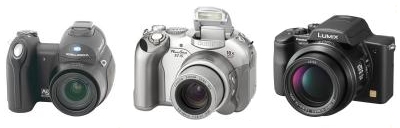
Minolta Z3 Canon S1 IS Panasonic FZ20
When it comes to cameras, size does matter. I've always had a thing for big lenses, with large apertures and long zooms. So it's with great interest that I've been following the various new long zoom digicams with anti-shake mechanisms. I've already commented on how impressed I was with the Minolta Z3 in my first play, but the more I read, the more I was convinced that the new Panasonic FZ20 was the toy for me. 12x optical, 5 MP, substantial hand grip and anti-shake. Almost as good as an SLR/fantastic value, the reviewers said, and I knew they were right.

That was until I played with one in the company of Sam from Ted's Cameras in Adelaide, never known to be backward with her photographic opinion. She was clearly unconvinced by the FZ20. She felt it was too slow to focus and stabilise the image, and the images were not as shake-free as the older and cheaper 3 MP Canon S1 IS. Well, that's not what I'd read in all the reviews, so I set out to prove her wrong.

And I failed. I got clicking with the Canon, the Panasonic and the 4 MP Minolta Z3, and after photographing both internal and external subjects I came to the following conclusions:
  1. The Canon IS system consistently gave less blurred results than the other two cameras, despite the lower resolution. This was very noticeable indoors in average lighting, less so in daylight.
  2. The Canon was also very much faster to acquire focus, with little or no hunting. By contrast the Panasonic hunted up and down fairly slowly before every shot, and the Minolta seemed to flitter with indecision several times before making its mind up. The Panasonic was frankly the most annoying in this regard.
  3. The Pana won in the image noise stakes, and at its best had more detail, but so it should being a more modern 5 MP camera.
  4. Overall, each of the anti-shake systems gave better results on than off, but the benefits were smaller than I'd imagined, and quite inconsistent so you never really knew how much benefit you'd get from shot to shot.
  5. Combine the time taken to focus with the time taken to stabilise, and you end up reducing your certainty of getting the shot you imagined. That tends to offset the advantages.
Well, that was all a bit of a disappointment. The stabilisation systems were clearly not the panacea for all ills I had imagined, and each of the cameras was ultimately fatally flawed. The Canon simply didn't have enough resolution for me, and has too small a screen although it does seem a brilliant thing at the price. The Panasonic was just too slow and the image stabilisation less good, and the Minolta is a cute little package but ultimately too shiny, toy-like and average in its picture taking. Bang for the buck these are all great value, and that Leica lens on the Panasonic is impressive. Any one of them will give you a lot of camera for the money, just bear in mind the issues I have raised and decide whether they are for you.

By now I was a shattered man, and experience tells me the best cure for that is simply to spend more money——a bit of the old 'retail therapy'. So when I learned that Nikon were offering $200 cashback on their SLRs, I broke the bank and ordered a Nikon D70 with 18––70 and 70––300 lenses, duty free. I might have added 60% to my budget but I'll end up with 16.7x optical zoom (out to the equivalent of 450 mm in 35 mm speak), far better pictures, much more versatility, fewer compromises and bigger muscles from carrying the camera bag and tripod.Go to eebahgum!

30 September 2004

Digicams: Curing the shakes

Camera shake is one of the most common afflictions of the amateur photographer, second only to camera envy. And while digital cameras encourage you to have a few goes until you get it right, it's not that easy to spot blurry images on a little LCD screen unless you zoom into them and check focus. The traditional solution has always been to carry a tripod or monopod, but non-pro snappers have always been averse to that.

Enter image stabilisation. It's been on video cameras and professional lenses for a few years, and has now made its way to mid-range digicams. There are a few competing systems out there. The Canon and Panasonic solutions cancel shake in the lens. The Konica Minolta solution moves the CCD sensor. The new Nikon solution just transfers the shake to your hip pocket, at least for now. The question is, do these systems work?

And the answer, from my experience so far, is a resounding 'yes'. I've seen excellent results from the Canon IS digicam, with its 10x zoom, and recently had a play with the new 4 MP Konica Minolta Z3. It looks like a Star Trek prop, and has rather too many shiny surfaces which I'd find myself rubbing fingerprints off all the time, but it's very compact and has an astonishing 12x zoom (35–420 in 35 mil-speak). Standing in the camera store I took photos of posters at a shop across a wide arcade, and at 12x zoom the text was crisp and shake free at about 1/100 of a second. Zooming in on-screen I could read the crisp fine print which I could only just detect with the naked eye. There's a bit of purple-fringing and noise levels are average, but overall this is a marvellous thing.

I'm looking forward to playing with the forthcoming Panasonic FZ20. With 5 MP and Leica lens which achieves f2.8 across the whole zoom range, I expect the results to be better, but it's also a vastly larger camera. Choices, choices...

29 September 2004

Digicams: The quest for the holy grail

It seems like much of my life is consumed by the search for the perfect digital camera. And of course, Heisenberg's Uncertainty Principle of Shopping applies--the longer I look, the more things change. At least I think I've defined my requirements now. All I'm after is a digital SLR with a stabilised 12x zoom and swiveling screen, of at least 8 megapixel resolution. And it has to be small enough to fit comfortably in my pocket, and cost no more than $500 US. Simple, right?

There have already been some interesting encounters on the quest--stay tuned!